# Understanding CSS specificity rules
> CSS specificity rules are tricky to understand. In this blog post we will learn how to master it.
URL: https://www.alexandrade.dev/blog/understanding-css-specificity-rules
Author: Alex Andrade
Published: 2021-07-28
Updated: 2021-07-28
Tags: CSS, Web Development, Frontend

If you have ever worked with CSS, I bet you have already faced a situation where some CSS changes were not getting applied as expected, making no sense at all. The solution ended up using the `!important` statement at the end of it. It magically worked! But you had no idea why.

`!important` is overriding one of the most crucial rules of CSS, the **specificity rule**. To understand how to avoid it, we first need to master this concept. So, let's deep dive into it.
Given the following code, guess what would be the color for boxes 1, 2 and 3.
```html
Box 1
Box 2
Box 3
```
Interesting enough, there is no red color in any of the boxes. Check the [code sandbox example](https://codesandbox.io/s/blue-sun-s8vcv?file=/index.html) out and play with it live.
Now, try adding an `!important` to the `body div` selector and see what happens.
```css
body div {
background-color: red !important;
}
```
Yes. Now all the boxes are red.
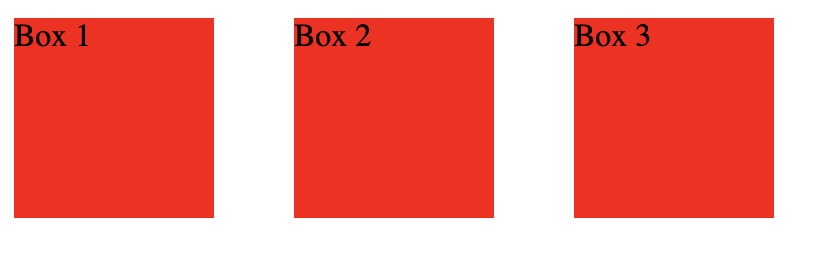
The `!important` is jumping the line and getting ahead of all the other rules that were already in queue defined by the priority (also called SPECIFICITY).

# How does this specificity rule work?
Imagine every selector has given a number in 3 categories let's suppose categories A, B and C.
When rendering the page and applying a given CSS property, the browser will choose the property within the selector with a higher score on CATEGORY A. If there is a tie, it will check the score on CATEGORY B. In case of tie again, it will now get the one with a higher CATEGORY C. If there is still a tie, it will grab the one that comes last in the code.
To make it clear, let's give some numbers to the selectors above:
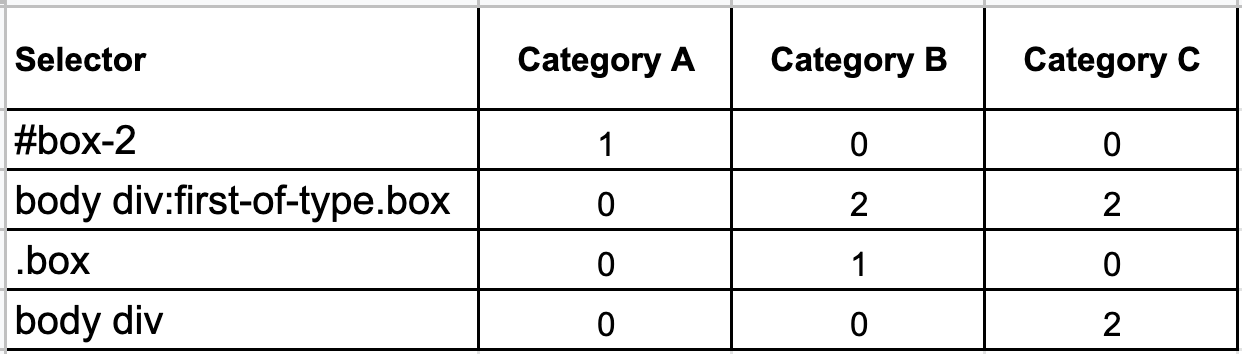
As we can see, the `#box-2` selector has the priority as it has a higher score on category A, followed by `body div:first-of-type.box` which has a higher score on category B than the remaining ones. Next comes the `.box` selector followed by the `body div` in the last position on the priority list.
You might be wondering what in fact are those categories. Here they are:
**Category A:** The number of ID selectors.
**Category B:** The number of class selectors, attribute selectors, and pseudo-classes.
**Category C:** The number of element (a.k.a. type) selectors and pseudo-elements.
The following table, created by [Estelle Weyl](https://estelle.github.io/CSS/selectors/specificity.html#slide3), demonstrates exactly how this hierarchy works using plankton, fish and sharks.
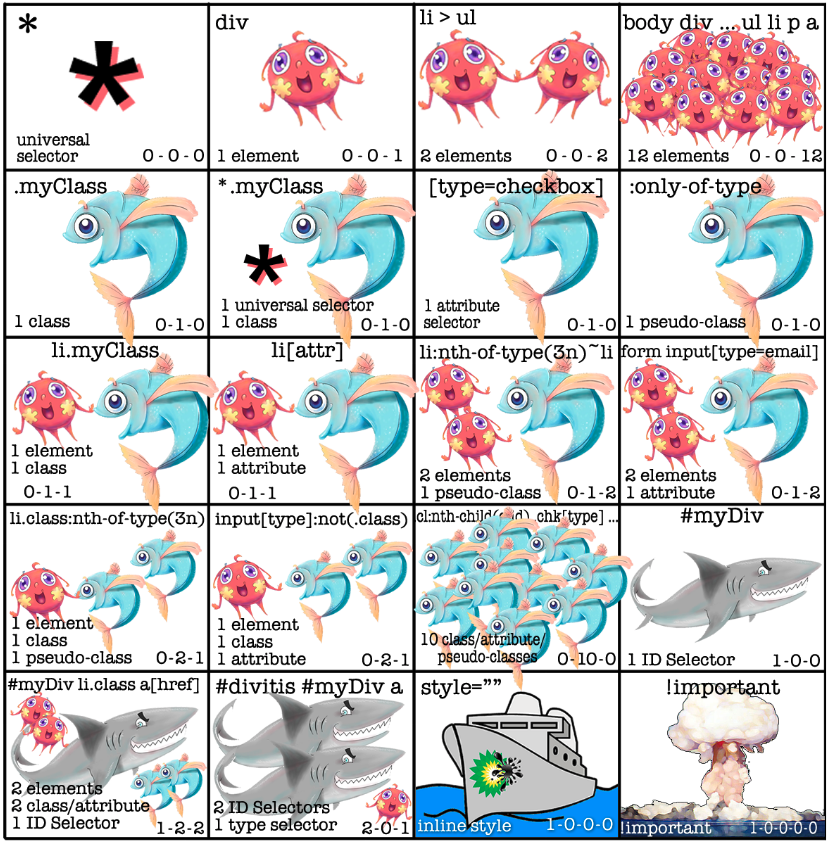
As you can see, the last two items in the table are `inline styles` and the `!important` statement. They are skipping all that hierarchy that CSS defines and are going straight to the front of the queue.
It is also worth noting that universal selector (`*,+,~s` ) and combinators do not increase specificity, that is why the first item on the table has a score `0-0-0`.
The same happens with the negation selector (`:not(x)`) which has no value, but the argument it takes has value.
# Conclusion
Using `!important` is much like using a nuclear explosion to stop the foxes from killing your chickens. Yes, the foxes will be killed, but so will the chickens. And the neighbourhood. It also makes debugging your CSS a nightmare (from personal, empirical, experience).
I know. It takes time and practice to master this concept but, understanding it will save you a ton of time and will help you avoid using `!important` as a silver bullet.
I hope this might help you.